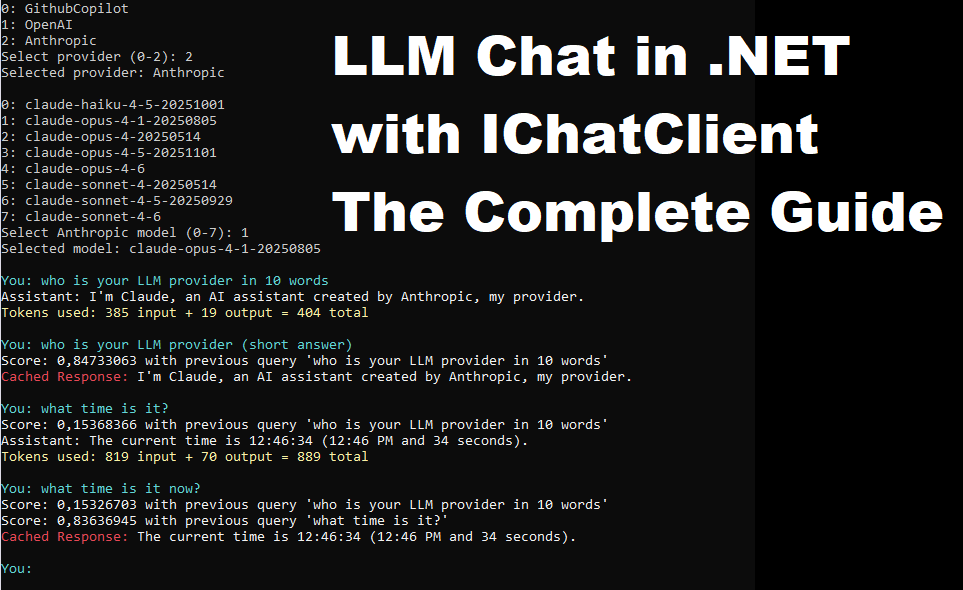
The IChatClient interface from the Microsoft.Extensions.AI package offers a clean, unified way to integrate LLMs like OpenAI, Copilot, or Anthropic into your application. It’s a solid abstraction—but the official docs only get you part of the way. We needed to go further before integrating it into our product. This guide is the result of that deep dive.
You’ll learn how to:
- Use
IChatClientacross multiple LLM providers - Discover and select available models for each LLM provider
- Build both stateless and stateful chat experiences
- Expose your own C# methods to the LLM (tooling / function calling)
- JSON format the response
- Track token usage and access telemetry
- Cache responses (exact match and semantic match)
You don’t need to read this post linearly. Start with how the chatClient is built and how the chat loop works, then feel free to jump between sections in whatever order suits you.
When you’re ready to experiment, head straight to the final section — Putting It All Together — where you’ll find a ready-to-compile Program.cs and Project.csproj.
Defining LLM Providers with an Enumeration
Let’s start by defining the LLM providers we’ll work with using an enumeration. This could easily be extended to include a local Ollama model or an Azure OpenAI deployment, but for this guide we’ll focus on these three major providers:
|
1 2 3 4 5 |
enum LLMProvider { GithubCopilot, OpenAI, Anthropic } |
Getting API Keys for Each LLM Provider
To use each LLM, you’ll need a token or key—here’s the step-by-step guide to obtain it:
|
1 2 3 4 5 6 7 8 9 10 11 12 13 |
static class Keys { // Obtain key from: https://github.com/settings/personal-access-tokens // > Generate new tokens > + Add permissons > Models internal const string GITHUB_PAT = "github_pat_***"; // Obtain key from: https://platform.openai.com/api-keys // > Create new secret token internal const string OPENAI_KEY = "sk-proj-***"; // Obtain key from: https://platform.claude.com/settings/keys // > + Create key internal const string ANTHROPIC_KEY = "sk-ant-***"; } |
Hardcoding secrets like API keys directly in source code is fine for quick experiments, but make sure to move them to environment variables before using this in anything serious.
Building the IChatClient object from the LLM provider choosen
Before instantiating ChatClient for any provider, add these packages to your .csproj:
|
1 2 3 4 5 6 7 |
<Project Sdk="Microsoft.NET.Sdk"> ... <ItemGroup> <PackageReference Include="Anthropic" Version="12.11.0" /> <PackageReference Include="Microsoft.Extensions.AI.OpenAI" Version="10.4.1" /> </ItemGroup> </Project> |
The imported Anthropic package is the official version. There is also a non-official Anthropic.SDK package, which caused a version mismatch with Microsoft.Extensions.AI in our environment. Although it certainly works fine, here we are using the official Anthropic package.
Assuming you have the llmProvider and the model identifier as string, here is the code to instantiate the ChatClient object. Here, we use fully qualified names to avoid adding multiple using statements for the different providers.
|
1 2 3 4 5 6 7 8 9 10 11 12 13 14 15 16 17 18 19 20 21 22 23 24 25 |
// // Build the IChatClient object // IChatClient? chatClient = null; switch(llmProvider) { case LLMProvider.GithubCopilot: chatClient = new OpenAI.Chat.ChatClient( model, new ApiKeyCredential(Keys.GITHUB_PAT), new OpenAI.OpenAIClientOptions { Endpoint = new Uri("https://models.github.ai/inference") } ).AsIChatClient(); break; case LLMProvider.OpenAI: chatClient = new OpenAI.Chat.ChatClient( model, new ApiKeyCredential(Keys.OPENAI_KEY) ).AsIChatClient(); break; case LLMProvider.Anthropic: Anthropic.AnthropicClient client = new( new Anthropic.Core.ClientOptions { ApiKey = Keys.ANTHROPIC_KEY }); chatClient = client.AsIChatClient(model); break; } |
The Chat Loop
Here is the chat loop code, which is fairly straightforward. Notice how we fetch the LLM response using successive chatClient!.GetStreamingResponseAsync() calls. For long responses, this allows your application to display the output as it arrives, improving responsiveness. Later, we’ll show how to use chatClient!.GetResponseAsync(...) to receive the entire response in one go.
|
1 2 3 4 5 6 7 8 9 10 11 12 13 14 15 16 |
while (true) { Console.ForegroundColor = ConsoleColor.Cyan; Console.Write("You: "); string userInput = Console.ReadLine() ?? ""; if (string.IsNullOrEmpty(userInput)) { break; } Console.ForegroundColor = ConsoleColor.White; Console.Write("Assistant: "); var sb = new StringBuilder(); await foreach (var response in chatClient!.GetStreamingResponseAsync( new ChatMessage(ChatRole.User, userInput))) { sb.Append(response.Text); Console.Write(response.Text); } Console.WriteLine(); } |
Stateless vs. Stateful Clients
So far, our chat has been stateless, meaning each query-response loop operates independently. Often, however, you want a stateful chat implemented through a chatHistory list. The example below illustrates why:
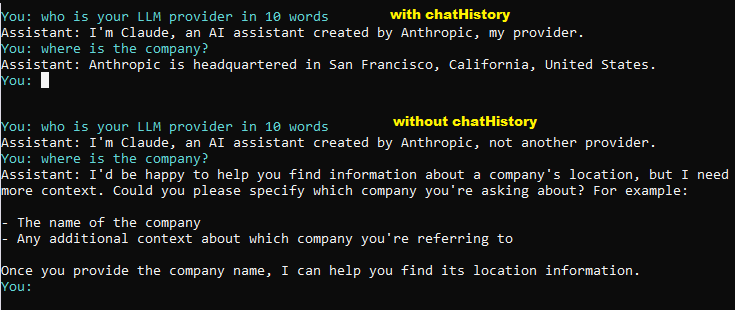
Here is the updated chat loop code, now using a chatHistory list:
|
1 2 3 4 5 6 7 8 9 10 11 12 13 14 15 16 17 18 19 20 |
// Need to keep track of the conversation history // as most LLMs are stateless and require the full conversation as input for each response List<ChatMessage> chatHistory = new(); while (true) { Console.ForegroundColor = ConsoleColor.Cyan; Console.Write("You: "); string userInput = Console.ReadLine() ?? ""; if (string.IsNullOrEmpty(userInput)) { break; } chatHistory.Add(new ChatMessage(ChatRole.User, userInput)); Console.ForegroundColor = ConsoleColor.White; Console.Write("Assistant: "); var sb = new StringBuilder(); await foreach (var response in chatClient!.GetStreamingResponseAsync(chatHistory)) { sb.Append(response.Text); Console.Write(response.Text); } chatHistory.Add(new ChatMessage(ChatRole.Assistant, sb.ToString())); Console.WriteLine(); } |
Chat Reducing (Experimental)
With a chatHistory list, messages accumulate, so each additional query consumes more tokens. This is why chat reduction is often applied: it helps manage conversation history by either limiting the number of messages or summarizing older ones once the conversation grows too long.
The Microsoft.Extensions.AI library includes an experimental SummarizingChatReducer, which automatically condenses older messages while preserving context. It can be used as shown, though we haven’t been able to get it working reliably yet.
|
1 2 3 4 5 6 7 |
// need this pragma because SummarizingChatReducer is still experimental #pragma warning disable MEAI001 chatClient = chatClient.AsBuilder() .UseFunctionInvocation() .UseChatReducer(new SummarizingChatReducer(chatClient, 5, 200)) .Build(); #pragma warning restore MEAI001 |
We’ll update this post once it works.
IChatClient Dependency injection
IChatClient implementations are typically provided to an application through dependency injection (DI). The code below demonstrates how to inject the chatClient object and how to access it from other parts of the application:
|
1 2 3 4 5 6 7 8 9 10 |
// App setup var builder = Host.CreateApplicationBuilder(); builder.Services.AddChatClient(chatClient); var host = builder.Build(); // ... // Elsewhere in the app // Resolve the IChatClient from the DI container // to ensure it's properly registered var chatClient = host.Services.GetRequiredService<IChatClient>(); |
This code requires this package:
|
1 |
<PackageReference Include="Microsoft.Extensions.Hosting" Version="10.0.5" /> |
Listing available models for a provider
We want to let the user choose from the most popular LLM providers and, for the selected provider, view and select from the available models.
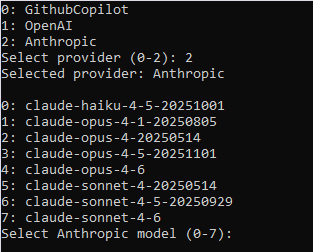
The following code shows how to list available model IDs for each provider. The desired model ID is then passed when constructing the IChatClient object.
|
1 2 3 4 5 6 7 8 9 10 11 12 13 14 15 16 17 18 19 20 21 22 23 24 25 26 27 28 29 30 31 32 33 34 35 36 37 38 39 40 41 42 43 |
static class Models { internal static async Task<List<string>> GetAvailableModelsAsync(LLMProvider provider) { using var http = new HttpClient(); string url = "",json; JsonDocument doc; switch (provider) { case LLMProvider.GithubCopilot: json = await http.GetStringAsync( "https://models.github.ai/catalog/models"); doc = JsonDocument.Parse(json); var models = doc.RootElement .EnumerateArray() .Select(m => m.GetProperty("id").GetString()!) .OrderBy(id => id) .ToList(); return models; case LLMProvider.OpenAI: url = "https://api.openai.com/v1/models"; http.DefaultRequestHeaders.Authorization = new AuthenticationHeaderValue("Bearer", Keys.OPENAI_KEY); break; case LLMProvider.Anthropic: url = "https://api.anthropic.com/v1/models"; http.DefaultRequestHeaders.Add("x-api-key", Keys.ANTHROPIC_KEY); http.DefaultRequestHeaders.Add("anthropic-version", "2023-06-01"); break; } var response = await http.GetAsync(url); response.EnsureSuccessStatusCode(); json = await response.Content.ReadAsStringAsync(); doc = JsonDocument.Parse(json); return doc.RootElement .GetProperty("data") .EnumerateArray() .Select(m => m.GetProperty("id").GetString()!) .OrderBy(id => id) .ToList(); } |
The JSON returned by each provider is not standardized. Below are excerpts of the responses from each provider:
- Github Copilot JSON:
|
1 2 3 4 5 6 7 8 9 10 11 12 13 14 15 16 17 18 19 20 |
[ { "id": "openai/gpt-4.1", "name": "OpenAI GPT-4.1", "publisher": "OpenAI", "summary": "gpt-4.1 outperforms gpt-4o across the board, with major gains in coding, instruction following, and long-context understanding", "rate_limit_tier": "high", "supported_input_modalities": [ "text", "image" ], "supported_output_modalities": [ "text" ], "tags": [ "multipurpose", "multilingual", "multimodal" ], "registry": "azure-openai", "version": "2025-04-14", "capabilities": [ "agents", "streaming", "tool-calling", "agentsV2" ], "limits": { "max_input_tokens": 1048576, "max_output_tokens": 32768 }, "html_url": "https://github.com/marketplace/models/azure-openai/gpt-4-1" }, ... |
- OpenAI JSON is formatted this way:
|
1 2 3 4 5 6 7 8 9 10 |
{ "object": "list", "data": [ { "id": "gpt-4-0613", "object": "model", "created": 1686588896, "owned_by": "openai" }, ... |
- Anthropic JSON is formatted this way:
|
1 2 3 4 5 6 7 8 9 10 11 12 13 14 15 16 17 18 19 20 21 22 23 24 25 26 27 28 29 30 31 32 33 34 35 36 37 38 39 |
{ "data": [ { "type": "model", "id": "claude-sonnet-4-6", "display_name": "Claude Sonnet 4.6", "created_at": "2026-02-17T00:00:00Z", "max_input_tokens": 1000000, "max_tokens": 128000, "capabilities": { "batch": { "supported": true }, "citations": { "supported": true }, "code_execution": { "supported": true }, "context_management": { "supported": true, "clear_tool_uses_20250919": { "supported": true }, "clear_thinking_20251015": { "supported": true }, "compact_20260112": { "supported": true } }, "effort": { "supported": true, "low": { "supported": true }, "medium": { "supported": true }, "high": { "supported": true }, "max": { "supported": true } }, "image_input": { "supported": true }, "pdf_input": { "supported": true }, "structured_outputs": { "supported": true }, "thinking": { "supported": true, "types": { "enabled": { "supported": true }, "adaptive": { "supported": true } } } } }, ... |
RAG and Agentic Patterns in C#: Letting the LLM Call Your Functions
One powerful feature of IChatClient is the ability to define one or more C# functions that the LLM can call when building the response, if needed. This enables Retrieval-Augmented Generation (RAG), allowing the LLM to access specific data it wouldn’t otherwise know—similar to how tools work on an MCP server. For more details, see our post Developing an MCP Server with C#: A Complete Guide, which shares insights from building the open-source NDepend.MCP.Server.
Letting the LLM decide which function to call and with which arguments is a step toward truly agentic behavior.
To make your functions available, first import the following package:
|
1 |
<PackageReference Include="Microsoft.Extensions.AI" Version="10.4.1" /> |
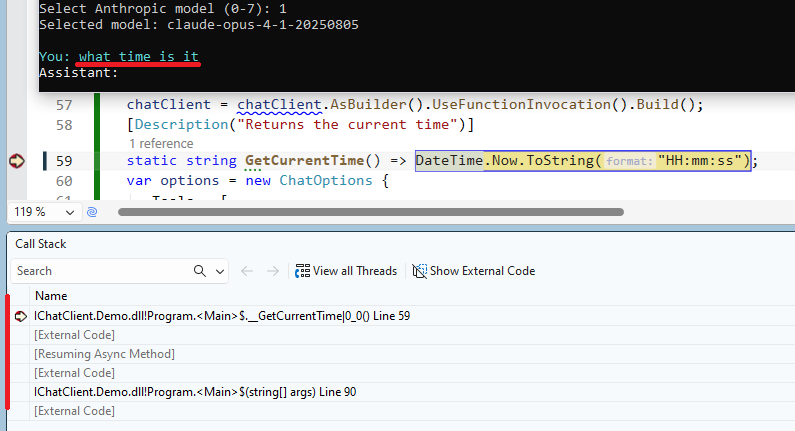
Then, the code below defines the GetCurrentTime() function and registers it as a chat option. You can describe the function and its parameters with the [DescriptionAttribute]:
|
1 2 3 4 5 6 7 8 9 |
chatClient = chatClient.AsBuilder().UseFunctionInvocation().Build(); [Description("Returns the current time")] static string GetCurrentTime() => DateTime.Now.ToString("HH:mm:ss"); var options = new ChatOptions { Tools = [ AIFunctionFactory.Create(GetCurrentTime), // more tools can be added ] }; |
Notice the chatClient feature chaining pattern: chatClient = chatClient.AsBuilder().UseFunctionInvocation().Build(); We’ll see more examples of this chaining pattern later.
Finally, you need to pass the chat options into the chat loop like this: chatClient!.GetStreamingResponseAsync(chatHistory, options)
And there you have it! We can now debug calls made by the LLM to our GetCurrentTime() function when asking “what time is it”:
Chat Options
The ChatOptions class introduced earlier—used to define functions callable by AI—also exposes several additional configuration properties:
public float? Temperature { get; set; }
Controls the randomness of the model’s output. Lower values produce more deterministic and consistent responses, while higher values increase variability and creativity.public long? Seed { get; set; }
Specifies a seed value that helps ensure reproducible results across multiple executions, provided the underlying service supports it.public Microsoft.Extensions.AI.ReasoningOptions? Reasoning { get; set; }
Defines the reasoning configuration applied to the chat request, allowing fine-tuning of how the model approaches problem-solving.- and more
JSON Response Formatting
The ChatOptions property public Microsoft.Extensions.AI.ChatResponseFormat? ResponseFormat { get; set; } can be used to format the response. For example:
|
1 2 3 4 |
var jsonResponse = await chatClient.GetResponseAsync( "Return a JSON object with name, capital, and population for France.", new ChatOptions { ResponseFormat = ChatResponseFormat.Json }); Console.WriteLine("\nJSON (free-form):\n" + jsonResponse.Text); |
This prints:
|
1 2 3 4 5 6 7 8 |
JSON (free-form): ```json { "name": "France", "capital": "Paris", "population": 67500000 } ``` |
A JSON schema can be forced:
|
1 2 3 4 5 6 7 8 9 10 11 12 13 14 15 16 17 18 19 20 21 22 23 24 25 26 27 |
JsonElement schema = JsonSerializer.Deserialize<JsonElement>(""" { "type": "object", "properties": { "name": { "type": "string" }, "capital": { "type": "string" }, "population": { "type": "number" } }, "required": ["name", "capital", "population"], "additionalProperties": false } """); var structuredResponse = await chatClient.GetResponseAsync( "Return details about France.", new ChatOptions { ResponseFormat = ChatResponseFormat.ForJsonSchema( schema, schemaName: "CountryInfo", schemaDescription: "Basic facts about a country") }); Console.WriteLine($"\nJSON (schema-constrained):\n{structuredResponse.Text}"); var info = JsonSerializer.Deserialize<CountryInfo>( structuredResponse.Text!, new JsonSerializerOptions { PropertyNameCaseInsensitive = true }); Console.WriteLine( $"\nParsed → {info!.Name}, capital: {info.Capital}, pop: {info.Population:N0}"); record CountryInfo(string Name, string Capital, long Population); |
This prints:
|
1 2 3 4 |
JSON (schema-constrained): {"name":"France","capital":"Paris","population":67391582} Parsed → France, capital: Paris, pop: 67 391 582 |
Counting Token
The cost of using an LLM is measured in tokens, making it essential to track both input and output token usage. Our chat loop can be modified as shown below. Currently, we didn’t find a better way to access UsageContent than this code: response.Contents.OfType<UsageContent>().FirstOrDefault()
|
1 2 3 4 5 6 7 8 9 10 11 12 13 14 15 16 |
<span class="crayon-t">var</span> <span class="crayon-v">sb</span> <span class="crayon-o">=</span> <span class="crayon-r">new</span> <span class="crayon-e">StringBuilder</span><span class="crayon-sy">(</span><span class="crayon-sy">)</span><span class="crayon-sy">;</span> long inputToken = 0, outputToken = 0; await foreach (var response in chatClient! .GetStreamingResponseAsync(chatHistory, options)) { sb.Append(response.Text); Console.Write(response.Text); var usageContent = response.Contents.OfType<UsageContent>().FirstOrDefault(); if (usageContent != null) { var usage = usageContent.Details; inputToken += usage.InputTokenCount ?? 0; outputToken += usage.OutputTokenCount ?? 0; } } chatHistory.Add(new ChatMessage(ChatRole.Assistant, sb.ToString())); Console.ForegroundColor = ConsoleColor.Yellow; Console.WriteLine($"\nTokens used: {inputToken} input + {outputToken} output = {inputToken + outputToken} total\n"); |
Due to the accumulation of chatHistory, we can observe how the number of input tokens increases with each query:
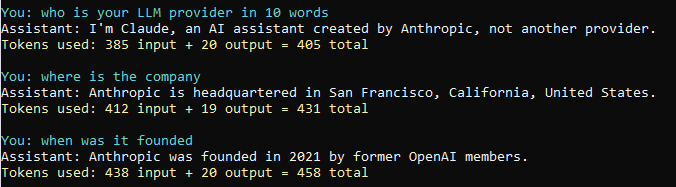
If we comment out the options to skip passing our GetCurrentTime() function—like this: GetStreamingResponseAsync(chatHistory/*, options*/)—we notice that far fewer input tokens are consumed (19 instead of 385!!). This illustrates a downside of AI functions (and MCP tools): they significantly increase token usage.

Show Telemetry
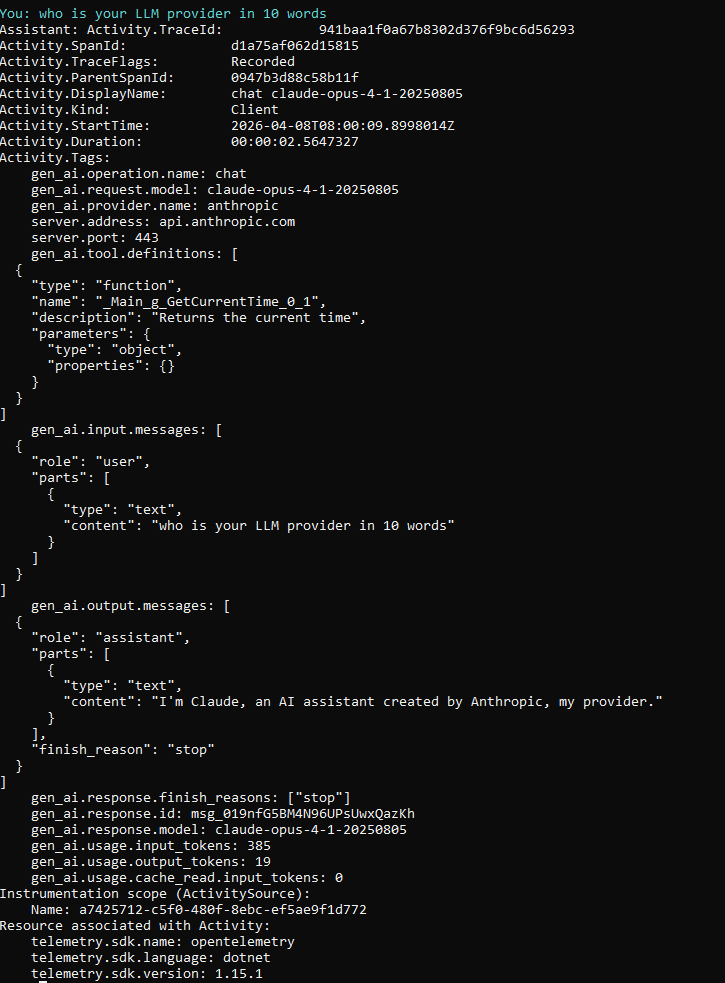
You might also be interested in LLM telemetry, which provides insights far beyond just token usage. OpenTelemetryChatClient acts as a wrapper around your standard IChatClient implementation. By using it, you gain automatic observability and telemetry for all interactions with your LLMs, without changing your existing code. Here’s why it’s useful:
- Centralized Monitoring – Track requests, responses, and errors from all your LLM providers in one place.
- Performance Metrics – Measure latency, throughput, and resource usage for each chat interaction.
- Distributed Tracing – See the full journey of a request, especially if your system calls multiple services before or after the LLM.
- Debugging Made Easy – Identify bottlenecks or failed calls quickly with structured logs and traces.
- Non-Intrusive Integration – Works seamlessly with any
IChatClientimplementation, so you don’t have to modify your core logic.
To have access to telemetry just import this package…
|
1 |
<PackageReference Include="OpenTelemetry.Exporter.Console" Version="1.15.1" /> |
… and then chain a TracerProvider with the chatClient:
|
1 2 3 4 5 6 7 8 9 10 11 12 13 |
// Configure OpenTelemetry exporter. string sourceName = Guid.NewGuid().ToString(); TracerProvider tracerProvider = OpenTelemetry.Sdk.CreateTracerProviderBuilder() .AddSource(sourceName) .AddConsoleExporter() // Print telemetry results .Build(); chatClient = chatClient.AsBuilder() .UseFunctionInvocation() .UseOpenTelemetry( sourceName: sourceName, configure: c => c.EnableSensitiveData = true) .Build(); |
Here is what telemetry on console looks like:
Receive the Full Response at Once Instead of Streaming
Until now, we’ve requested streaming chat responses, but it’s also possible to receive the full response at once. This simplifies the code, though the chat becomes less responsive for the user. Note that this approach does not affect token consumption:
|
1 2 3 4 5 6 7 8 9 10 11 12 |
long inputToken = 0, outputToken = 0; var response = await chatClient!.GetResponseAsync(chatHistory, options); Console.Write(response.Text); var usage = response.Usage; if (usage != null) { inputToken += usage.InputTokenCount ?? 0; outputToken += usage.OutputTokenCount ?? 0; } chatHistory.Add(new ChatMessage(ChatRole.Assistant, response.Text)); Console.ForegroundColor = ConsoleColor.Yellow; Console.WriteLine( $"\nTokens used: {inputToken} input + {outputToken} output = {inputToken + outputToken} total\n"); |
Chat History System Prompt
You can shape the LLM’s behavior through the system prompt, which is the standard way to inject a persona or skills via IChatClient. Here’s how:
|
1 2 3 4 5 6 7 8 |
List<ChatMessage> chatHistory = new(); chatHistory.Add(new ChatMessage(ChatRole.System, """ You are an expert C# and .NET architect with 20 years of experience. - Answer concisely with code examples when relevant - Always mention performance implications - Prefer modern C# idioms (pattern matching, records, spans) """)); |
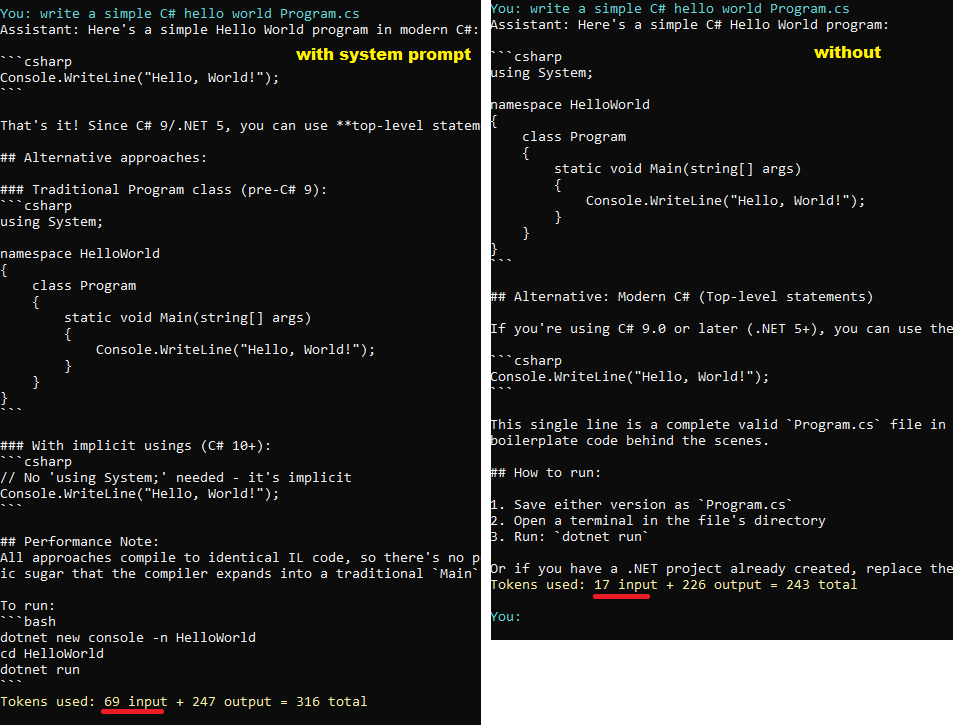
As the screenshot below illustrates, the system prompt counts toward your input token usage:
Response Caching — Exact Query Match
Tokens can be costly, and if thousands of users are asking similar questions, it’s worth caching LLM responses. First, we’ll look at caching responses based on an exact match of the query text. The next section will cover semantic matching, where queries like ‘Who is your LLM provider in 10 words?’ and ‘Who is your LLM provider in ten words?’ return the same response. Below is the chatClient chaining code for exact-match caching:
|
1 2 3 4 5 |
chatClient = chatClient.AsBuilder() .UseFunctionInvocation() .UseDistributedCache(new MemoryDistributedCache( Options.Create(new MemoryDistributedCacheOptions()))) .Build(); |
To compile this code import this package:
|
1 |
<PackageReference Include="Microsoft.Extensions.Caching.Memory" Version="10.0.5" /> |
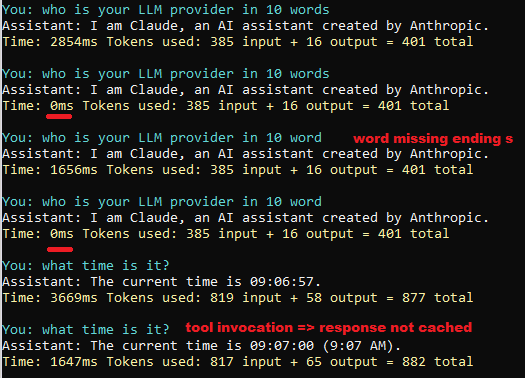
To detect when a response comes from the cache, we measure the time it takes to retrieve it. Responses from the LLM take a few seconds, while cached responses are returned instantly. We also disable chatHistory; otherwise, asking the same query a second time wouldn’t be treated as identical.
|
1 2 3 4 5 6 7 8 9 10 11 12 13 14 15 16 17 18 19 |
long inputToken = 0, outputToken = 0; // Measure the time taken for the LLM to respond // => short time indicates a cached response var sw = Stopwatch.StartNew(); // Don't use chatHistory, else // we cannot demonstrate the cache usage at the second time! var response = await chatClient!.GetResponseAsync( new ChatMessage(ChatRole.User, userInput), options); sw.Stop(); Console.Write(response.Text); var usage = response.Usage; if (usage != null) { inputToken += usage.InputTokenCount ?? 0; outputToken += usage.OutputTokenCount ?? 0; } chatHistory.Add(new ChatMessage(ChatRole.Assistant, response.Text)); Console.ForegroundColor = ConsoleColor.Yellow; Console.WriteLine( $"\nTime: {sw.ElapsedMilliseconds}ms Tokens used: {inputToken} input + {outputToken} output = {inputToken + outputToken} total\n"); |
Here is a demonstration. Even a single-character difference causes the cache to miss, triggering a new LLM call. Additionally, when a function is invoked, the response cannot be cached.
Response Caching — Semantic Query Match
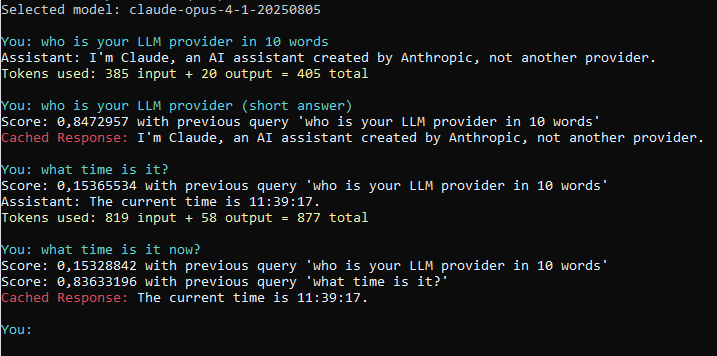
Let’s wrap up this blog post with semantic query matching. The idea is to represent each query as a high-dimensional vector, also called an embedding. When a new query comes in, we measure how close its embedding is to those of previously seen queries. This closeness — the cosine similarity — is a scalar between 0.0 and 1.0, where 1.0 means the vectors point in exactly the same direction. If the similarity exceeds a defined threshold, we consider the queries semantically equivalent and return the cached answer directly, sparing an expensive LLM call. Here is the kind of behavior we want:
The KnowledgeBase class
See below our KnowledgeBase class, which stores previous queries alongside their answers and embeddings. We use a similarity threshold of 0.8 — chosen arbitrarily for this example, but in practice this value deserves careful tuning. Set it too high and the cache rarely triggers, making it useless. Set it too low and it starts returning answers that don’t actually match the incoming query.
Note that the embedding client is wired to OpenAI.Embeddings.EmbeddingClient and Keys.OPENAI, but this is purely an implementation detail. The chatClient and the embedding client are completely independent, so the KnowledgeBase works regardless of which LLM powers the chat side.
If embeddings are persisted to a database, make sure to always generate them with the same embedding model — swapping it out will invalidate every stored vector.
The following NuGet package is required to compile this class:
|
1 |
<PackageReference Include="System.Numerics.Tensors" Version="10.0.5" /> |
|
1 2 3 4 5 6 7 8 9 10 11 12 13 14 15 16 17 18 19 20 21 22 23 24 25 26 27 28 29 30 31 32 33 34 35 36 37 38 39 40 41 42 43 |
sealed class KnowledgeBase { private readonly IEmbeddingGenerator<string, Embedding<float>> m_Embedder; // Query is not required for retrieval but is stored here for demonstration purposes // to show which previous query matched the current one private readonly List<(ReadOnlyMemory<float> Vector, string Query, string Response)> m_CachedResponses = new(); internal KnowledgeBase() { m_Embedder = new OpenAI.Embeddings.EmbeddingClient( "text-embedding-3-small", new ApiKeyCredential(Keys.OPENAI_KEY) ).AsIEmbeddingGenerator(); } const float SIMILARITY_THRESHOLD = 0.8f; internal bool TryFindCachedResponse( string query, out string response, out Embedding<float> queryEmbedding) { queryEmbedding = m_Embedder.GenerateAsync(query).Result; ReadOnlySpan<float> vectorSpan = queryEmbedding.Vector.Span; float bestScore = 0; response = ""; foreach (var cr in m_CachedResponses) { float score = TensorPrimitives.CosineSimilarity(vectorSpan, cr.Vector.Span); if(score > bestScore) { bestScore = score; response = cr.Response; Console.WriteLine($"Score: {bestScore} with previous query '{cr.Query}'"); } } return bestScore > SIMILARITY_THRESHOLD; } internal void CacheResponse( Embedding<float> queryEmbedding, string query, string response) { m_CachedResponses.Add(new (queryEmbedding.Vector, query, response)); } } |
The chat loop updated
Below see the updated chatLoop, now querying the knowledge base before falling back to the LLM.
For brevity, we stripped out chatHistory — but unlike the exact match approach from the previous section, history doesn’t interfere with semantic matching, which only looks at the raw userInput string.
That said, caching across different history contexts should be used with caution: if the same query is asked twice but the conversation has taken a different path, the cached answer may no longer be appropriate.
|
1 2 3 4 5 6 7 8 9 10 11 12 13 14 15 16 17 18 19 20 21 22 23 24 25 26 27 28 29 30 31 32 33 |
var kb = new KnowledgeBase(); while(true) { Console.ForegroundColor = ConsoleColor.Cyan; Console.Write("You: "); string userInput = Console.ReadLine() ?? ""; if (string.IsNullOrEmpty(userInput)) { break; } Console.ForegroundColor = ConsoleColor.White; // Try get a cached response from the knowledge base before calling the LLM if (kb.TryFindCachedResponse(userInput, out string cachedResponse, out Embedding<float> queryEmbedding)) { Console.ForegroundColor = ConsoleColor.Red; Console.Write("Cached Response: "); Console.ForegroundColor = ConsoleColor.White; Console.Write($"{cachedResponse}\n"); continue; } Console.Write("Assistant: "); long inputToken = 0, outputToken = 0; var response = await chatClient!.GetResponseAsync( new ChatMessage(ChatRole.User, userInput), options); kb.CacheResponse(queryEmbedding, userInput, response.Text); Console.Write(response.Text); var usage = response.Usage; if (usage != null) { inputToken += usage.InputTokenCount ?? 0; outputToken += usage.OutputTokenCount ?? 0; } Console.ForegroundColor = ConsoleColor.Yellow; Console.WriteLine( $"\nTokens used: {inputToken} input + {outputToken} output = {inputToken + outputToken} total\n"); } |
For larger caches, the KnowledgeBase class could be extended to index the vector column, reducing similarity lookup to constant time regardless of how many embeddings are stored. We’ll leave that as an exercise — your preferred LLM would be happy to walk you through the implementation if you ever need it.
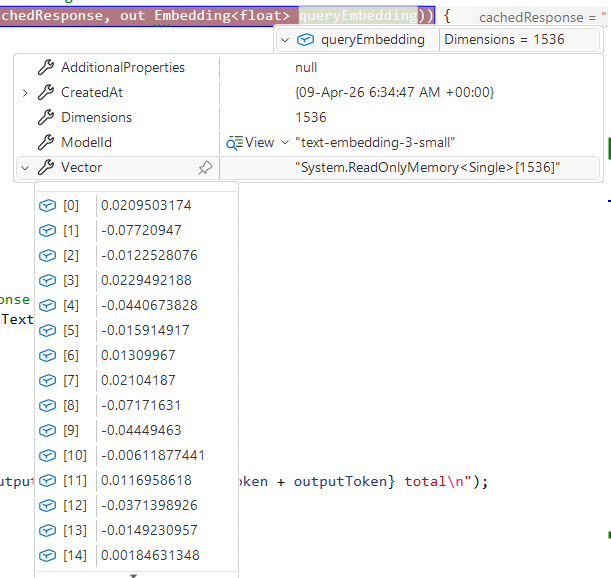
As a fun aside, the embeddings we worked with during testing came out at 1,536 dimensions each.
Putting It All Together
To finish, here is the ready-to-compile Program.cs and Project.csproj demonstrating the multiple LLM provider and their models support, the AI function, and the stateless chat loop with query embedding cache. Just drop in your API keys before running.
|
1 2 3 4 5 6 7 8 9 10 11 12 13 14 |
<Project Sdk="Microsoft.NET.Sdk"> <PropertyGroup> <OutputType>Exe</OutputType> <TargetFramework>net10.0</TargetFramework> <ImplicitUsings>enable</ImplicitUsings> <Nullable>enable</Nullable> </PropertyGroup> <ItemGroup> <PackageReference Include="Anthropic" Version="12.11.0" /> <PackageReference Include="Microsoft.Extensions.AI.OpenAI" Version="10.4.1" /> <PackageReference Include="Microsoft.Extensions.AI" Version="10.4.1" /> <PackageReference Include="System.Numerics.Tensors" Version="10.0.5" /> </ItemGroup> </Project> |
The C# code:
|
1 2 3 4 5 6 7 8 9 10 11 12 13 14 15 16 17 18 19 20 21 22 23 24 25 26 27 28 29 30 31 32 33 34 35 36 37 38 39 40 41 42 43 44 45 46 47 48 49 50 51 52 53 54 55 56 57 58 59 60 61 62 63 64 65 66 67 68 69 70 71 72 73 74 75 76 77 78 79 80 81 82 83 84 85 86 87 88 89 90 91 92 93 94 95 96 97 98 99 100 101 102 103 104 105 106 107 108 109 110 111 112 113 114 115 116 117 118 119 120 121 122 123 124 125 126 127 128 129 130 131 132 133 134 135 136 137 138 139 140 141 142 143 144 145 146 147 148 149 150 151 152 153 154 155 156 157 158 159 160 161 162 163 164 165 166 167 168 169 170 171 172 173 174 175 176 177 178 179 180 181 182 183 184 185 186 187 188 189 190 191 192 193 194 195 196 197 198 199 200 201 202 203 204 205 206 207 208 209 210 211 212 213 214 215 216 217 218 219 |
using System.ClientModel; using System.ComponentModel; using System.Net.Http.Headers; using System.Numerics.Tensors; using System.Text.Json; using Microsoft.Extensions.AI; // // Choose an LLM provider // var providers = Enum.GetValues<LLMProvider>(); var llmProvider = providers[PromptSelection(providers, "provider")]; Console.WriteLine($"Selected provider: {llmProvider}\n"); // // Chose a model // var models = await Models.GetAvailableModelsAsync(llmProvider); var model = models[PromptSelection(models, $"{llmProvider} model")]; Console.WriteLine($"Selected model: {model}\n"); // // Build the IChatClient object // IChatClient? chatClient = null; switch(llmProvider) { case LLMProvider.GithubCopilot: chatClient = new OpenAI.Chat.ChatClient( model, new ApiKeyCredential(Keys.GITHUB_PAT), new OpenAI.OpenAIClientOptions { Endpoint = new Uri("https://models.github.ai/inference") } ).AsIChatClient(); break; case LLMProvider.OpenAI: chatClient = new OpenAI.Chat.ChatClient( model, new ApiKeyCredential(Keys.OPENAI_KEY) ).AsIChatClient(); break; case LLMProvider.Anthropic: Anthropic.AnthropicClient client = new( new Anthropic.Core.ClientOptions { ApiKey = Keys.ANTHROPIC_KEY }); chatClient = client.AsIChatClient(model); break; } // // Define a tool // chatClient = chatClient.AsBuilder() .UseFunctionInvocation() .Build(); [Description("Returns the current time")] static string GetCurrentTime() => DateTime.Now.ToString("HH:mm:ss"); var options = new ChatOptions { Tools = [ AIFunctionFactory.Create(GetCurrentTime), // more tools can be added ] }; // // Run the chat loop // var kb = new KnowledgeBase(); // Comment chat history since we test semantic caching // in the knowledge base instead. //List<ChatMessage> chatHistory = new(); while (true) { Console.ForegroundColor = ConsoleColor.Cyan; Console.Write("You: "); string userInput = Console.ReadLine() ?? ""; if (string.IsNullOrEmpty(userInput)) { break; } //chatHistory.Add(new ChatMessage(ChatRole.User, userInput)); Console.ForegroundColor = ConsoleColor.White; // Try get a cached response from the knowledge base before calling the LLM if (kb.TryFindCachedResponse(userInput, out string cachedResponse, out Embedding<float> queryEmbedding)) { Console.ForegroundColor = ConsoleColor.Red; Console.Write("Cached Response: "); Console.ForegroundColor = ConsoleColor.White; Console.Write($"{cachedResponse}\n\n"); continue; } Console.Write("Assistant: "); long inputToken = 0, outputToken = 0; var response = await chatClient.GetResponseAsync( //chatHistory, new ChatMessage(ChatRole.User, userInput), options); //chatHistory.Add(new ChatMessage(ChatRole.Assistant, response.Text)); kb.CacheResponse(queryEmbedding, userInput, response.Text); Console.Write(response.Text); var usage = response.Usage; if (usage != null) { inputToken += usage.InputTokenCount ?? 0; outputToken += usage.OutputTokenCount ?? 0; } Console.ForegroundColor = ConsoleColor.Yellow; Console.WriteLine( $"\nTokens used: {inputToken} input + {outputToken} output = {inputToken + outputToken} total\n"); } static int PromptSelection<T>(IReadOnlyList<T> items, string title) { for (int i = 0; i < items.Count; i++) Console.WriteLine($"{i}: {items[i]}"); Console.Write($"Select {title} (0-{items.Count - 1}): "); return int.Parse(Console.ReadLine()!); } enum LLMProvider { GithubCopilot, OpenAI, Anthropic } static class Keys { // Obtain key from: https://github.com/settings/personal-access-tokens // > Generate new tokens > + Add permissons > Models internal const string GITHUB_PAT = "github_pat_***"; // Obtain key from: https://platform.openai.com/api-keys // > Create new secret token internal const string OPENAI_KEY = "sk-proj-***"; // Obtain key from: https://platform.claude.com/settings/keys // > + Create key internal const string ANTHROPIC_KEY = "sk-ant-api03-***"; } sealed class KnowledgeBase { private readonly IEmbeddingGenerator<string, Embedding<float>> m_Embedder; // Query is not required for retrieval but is stored here for demonstration purposes // to show which previous query matched the current one private readonly List<(ReadOnlyMemory<float> Vector, string Query, string Response)> m_CachedResponses = new(); internal KnowledgeBase() { m_Embedder = new OpenAI.Embeddings.EmbeddingClient( "text-embedding-3-small", new ApiKeyCredential(Keys.OPENAI_KEY) ).AsIEmbeddingGenerator(); } const float SIMILARITY_THRESHOLD = 0.8f; internal bool TryFindCachedResponse( string query, out string response, out Embedding<float> queryEmbedding) { queryEmbedding = m_Embedder.GenerateAsync(query).Result; ReadOnlySpan<float> vectorSpan = queryEmbedding.Vector.Span; float bestScore = 0; response = ""; foreach (var cr in m_CachedResponses) { float score = TensorPrimitives.CosineSimilarity(vectorSpan, cr.Vector.Span); if(score > bestScore) { bestScore = score; response = cr.Response; Console.WriteLine($"Score: {bestScore} with previous query '{cr.Query}'"); } } return bestScore > SIMILARITY_THRESHOLD; } internal void CacheResponse( Embedding<float> queryEmbedding, string query, string response) { m_CachedResponses.Add(new (queryEmbedding.Vector, query, response)); } } static class Models { internal static async Task<List<string>> GetAvailableModelsAsync(LLMProvider provider) { using var http = new HttpClient(); string url = "", json; JsonDocument doc; switch (provider) { case LLMProvider.GithubCopilot: json = await http.GetStringAsync("https://models.github.ai/catalog/models"); doc = JsonDocument.Parse(json); var models = doc.RootElement .EnumerateArray() .Select(m => m.GetProperty("id").GetString()!) .OrderBy(id => id) .ToList(); return models; case LLMProvider.OpenAI: url = "https://api.openai.com/v1/models"; http.DefaultRequestHeaders.Authorization = new AuthenticationHeaderValue("Bearer", Keys.OPENAI_KEY); break; case LLMProvider.Anthropic: url = "https://api.anthropic.com/v1/models"; http.DefaultRequestHeaders.Add("x-api-key", Keys.ANTHROPIC_KEY); http.DefaultRequestHeaders.Add("anthropic-version", "2023-06-01"); break; } var response = await http.GetAsync(url); response.EnsureSuccessStatusCode(); json = await response.Content.ReadAsStringAsync(); doc = JsonDocument.Parse(json); return doc.RootElement .GetProperty("data") .EnumerateArray() .Select(m => m.GetProperty("id").GetString()!) .OrderBy(id => id) .ToList(); } } |
Conclusion
Demystifying IChatClient was a rewarding exercise, and one with a practical motivation — we have ideas for bringing it into NDepend to make the tool smarter.
We also evaluated the GitHub Copilot SDK, which imposes a higher barrier to entry — users must have the GitHub Copilot CLI and a valid key — but offers stronger potential for agentic workflows, making it a compelling direction for future iterations.
But keep in mind that the interface itself is just plumbing. The real value lies in your prompt design and the AI-powered logic you build around it, which is what ultimately guides the LLM toward something genuinely useful for your users.
It’s great that this post dives into the use of
IChatClientand how it can seamlessly integrate multiple LLM providers. I really like the section on handling both stateless and stateful chat experiences, as it’s something many developers overlook when building scalable chat applications.