
When I was attending night school to become a programmer, I learned several design patterns: singleton, repository, factory, builder, decorator, etc. Design patterns give us a proven solution to existing and recurring problems. What I didn’t learn was that a similar mechanism exists on a higher level in the form of the software architecture pattern.
A software architecture pattern is a reusable, high-level blueprint for how an entire system is organized: how you split the big pieces, where each responsibility lives, and how those pieces talk to each other. Where a design pattern solves a problem inside a class or a small group of classes, an architecture pattern shapes the whole application, or even a set of applications that work together.
That distinction trips up a lot of developers, so let me be clear about it. Design patterns (singleton, factory, observer) work at the code level. Software architecture patterns (layered, microservices, CQRS) work at the system level. You’ll often use both in the same project, and they don’t compete with each other.
These are patterns for the overall layout of your application or applications. They all have advantages and disadvantages. And they all address specific issues.
In this post, we’ll look at 5 of the most common software architecture patterns in detail. For each one, you’ll get a plain description, its advantages, its disadvantages, and the situation it’s ideal for. The patterns are as follows.
- The Layered Architectural Pattern
- The Microkernel Architectural Pattern
- The CQRS Architectural Pattern
- The Event Sourcing Architectural Pattern
- The Microservices Architectural Pattern
Download the NDepend trial for free and use dependency graphs to get a feel for what your software architecture really looks like.
The 5 Software Architecture Patterns at a Glance
If you only have a minute, here’s how the five patterns compare before we get into the detail of each one.
| Pattern | Core idea | Best for | Main trade-off |
|---|---|---|---|
| Layered (n-tier) | Stack the code in horizontal layers, where each layer only calls the one below it. | Standard line-of-business applications. | Can drift into a monolith that is hard to split up later. |
| Microkernel (plug-in) | A small, stable core plus interchangeable plug-ins. | Products with a fixed core and lots of optional features. | Hard to get the plug-in API right up front. |
| CQRS | Separate the model you write with from the model you read with. | Read-heavy apps and complex domains. | Keeping the read and write sides in sync adds complexity. |
| Event Sourcing | Store the events that happened instead of the current state. | Apps that need an audit trail or are built with CQRS. | You can’t fix data with a quick edit, and event schemas are tricky to change. |
| Microservices | Build the system as small services you can deploy on their own. | Large apps whose parts scale or evolve at different speeds. | All the usual distributed-system pain: communication, coordination, debugging. |
1. The Layered Architectural Pattern
The layered pattern, also called n-tier architecture, is probably the most well-known software architecture pattern of them all.
Many developers use it without really knowing its name. The idea is to split up your code into “layers”, where each layer has a certain responsibility and provides a service to a higher layer.
There isn’t a predefined number of layers, but these are the ones you see most often:
- Presentation or UI layer
- Application layer
- Business or domain layer
- Persistence or data access layer
- Database layer
The idea is that the user initiates a piece of code in the presentation layer by performing some action (e.g. clicking a button). The presentation layer then calls the underlying layer, i.e. the application layer.
Then we go into the business layer and finally, the persistence layer stores everything in the database. So higher layers depend on and make calls to the lower layers, never the other way around. That one rule, calls only ever go downward, is what keeps a layered design honest.

You will see variations of this, depending on the complexity of the application. Some applications might omit the application layer, while others add a caching layer.
It’s even possible to merge two layers into one. For example, the ActiveRecord pattern combines the business and persistence layers.
Layer Responsibility
As mentioned, each layer has its own responsibility.
The presentation layer contains the graphical design of the application, as well as any code to handle user interaction. You shouldn’t add logic that isn’t specific to the user interface in this layer.
In the business layer, you put the models and logic that is specific to the business problem you are trying to solve.
The application layer sits between the presentation layer and the business layer.
On the one hand, it provides an abstraction so that the presentation layer doesn’t need to know the business layer. In theory, you could change the technology stack of the presentation layer without changing anything else in your application (e.g. change from WinForms to WPF).
On the other hand, the application layer provides a place to put certain coordination logic that doesn’t fit in the business or presentation layer.

Finally, the persistence layer contains the code to access the database layer. The database layer is the underlying database technology (e.g. SQL Server, MongoDB). The persistence layer is the set of code to manipulate the database: SQL statements, connection details, etc.
The hard part in practice isn’t drawing these layers, it’s keeping them clean as the codebase grows. It only takes one shortcut, a UI class reaching straight into the database to save a deadline, and the whole benefit starts to leak away. This is exactly the kind of thing a dependency graph or a dependency matrix will surface for you, by showing a call that skips a layer or points the wrong way.
Advantages
- Most developers are familiar with this pattern, so onboarding is easy.
- It provides an easy way of writing a well-organized and testable application.
- You can swap out the technology in one layer (say, the UI or the database) without rewriting the rest.
Disadvantages
- It tends to lead to monolithic applications that are hard to split up afterward.
- Developers often find themselves writing a lot of code to pass through the different layers, without adding any value in these layers. If all you are doing is writing a simple CRUD application, the layered pattern might be overkill for you.
Ideal for:
- Standard line-of-business apps that do more than just CRUD operations
- Teams that are new to a domain and want a structure everyone already understands
2. The Microkernel Architectural Pattern
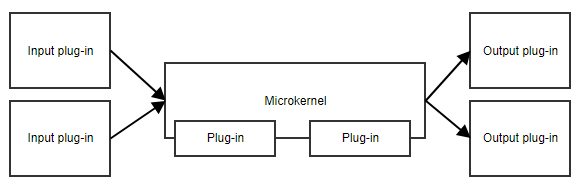
The microkernel pattern, or plug-in pattern, is useful when your application has a core set of responsibilities and a collection of interchangeable parts on the side. The microkernel provides the entry point and the general flow of the application, without really knowing what the different plug-ins are doing.
An example is a task scheduler.
The microkernel could contain all the logic for scheduling and triggering tasks, while the plug-ins contain specific tasks. As long as the plug-ins adhere to a predefined API, the microkernel can trigger them without needing to know the implementation details.
Another example is a workflow. The implementation of a workflow contains concepts like the order of the different steps, evaluating the results of steps, deciding what the next step is, etc. The specific implementation of the steps is less important to the core code of the workflow.
You’re also using this pattern every day without thinking about it. Your IDE or code editor, your web browser with its extensions, even a lot of accounting and ERP products all ship a small core and let third parties bolt features on through a published API. That is the microkernel pattern in the wild.
Advantages
- This pattern provides great flexibility and extensibility.
- Some implementations allow for adding plug-ins while the application is running.
- The microkernel and the plug-ins can be developed by separate teams, even outside your own company.
Disadvantages
- It can be difficult to decide what belongs in the microkernel and what doesn’t.
- The predefined API might not be a good fit for future plug-ins, and changing it once plug-ins depend on it is painful.
Ideal for:
- Applications that take data from different sources, transform that data and write it to different destinations
- Workflow applications
- Task and job scheduling applications
- Products built around a stable core that customers extend with their own features
3. The CQRS Architectural Pattern
CQRS is an acronym for Command and Query Responsibility Segregation. The central concept of this pattern is that an application has read operations and write operations that must be totally separated.
This also means that the model used for write operations (commands) will differ from the read models (queries). Furthermore, the data will be stored in different locations. In a relational database, this means there will be tables for the command model and tables for the read model. Some implementations even store the different models in totally different databases, e.g. SQL Server for the command model and MongoDB for the read model.
This pattern is often combined with event sourcing, which we’ll cover below.
How does it work exactly?
When a user performs an action, the application sends a command to the command service. The command service retrieves any data it needs from the command database, makes the necessary manipulations and stores that back in the database. It then notifies the read service so that the read model can be updated. This flow can be seen below.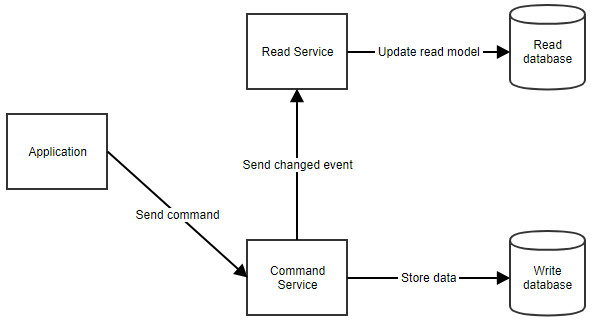
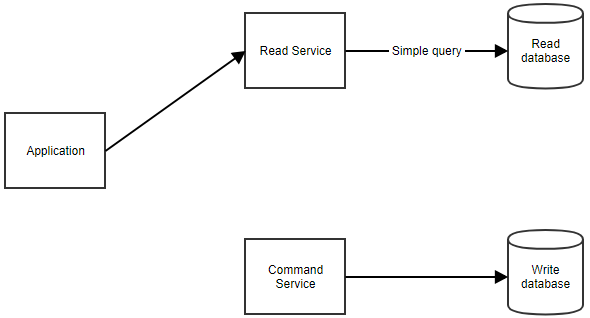
When the application needs to show data to the user, it can retrieve the read model by calling the read service, as shown below.
One thing to keep in mind: the read side is usually updated a moment after the write side, so the two are eventually consistent rather than instantly in sync. For most read-heavy apps that lag is invisible, but it’s a real design decision you have to make peace with before you reach for CQRS.
Advantages
- Command models can focus on business logic and validation while read models can be tailored to specific scenarios.
- You can avoid complex queries (e.g. joins in SQL) which makes the reads more performant.
- You can scale the read side and the write side independently, which matters when one of them takes far more traffic.
Disadvantages
- Keeping the command and the read models in sync can become complex.
- It’s more moving parts than a single shared model, so it’s easy to over-engineer a simple app with it.
Ideal for:
- Applications that expect a high amount of reads
- Applications with complex domains
4. The Event Sourcing Architectural Pattern
As I mentioned above, CQRS often goes hand in hand with event sourcing. This is a pattern where you don’t store the current state of your model in the database, but rather the events that happened to the model. So when the name of a customer changes, you won’t store the value in a “Name” column. You will store a “NameChanged” event with the new value (and possibly the old one too).
When you need to retrieve a model, you retrieve all its stored events and reapply them on a new object. We call this rehydrating an object.
An Accounting Analogy
A real-life analogy of event sourcing is accounting. When you add an expense, you don’t change the value of the total. In accounting, a new line is added with the operation to be performed.
If an error was made, you simply add a new line. To make your life easier, you could calculate the total every time you add a line. This total can be regarded as the read model. The example below should make it more clear.

You can see that we made an error when adding Invoice 201805. Instead of changing the line, we added two new lines: first, one to cancel the wrong line, then a new and correct line.
This is how event sourcing works. You never remove events, because they have undeniably happened in the past. To correct situations, we add new events.
Also, note how we have a cell with the total value. This is simply a sum of all values in the cells above. In Excel, it automatically updates so you could say it synchronizes with the other cells. It is the read model, providing an easy view for the user.
Event sourcing is often combined with CQRS because rehydrating an object can have a performance impact, especially when there are a lot of events for the instance. A fast read model can significantly improve the response time of the application.
If you’ve ever used Git, you already have a good mental model for this. Git doesn’t store the current state of your files, it stores the sequence of commits that got you there, and it rebuilds the working tree from that history. Event sourcing applies the same idea to your business data.
Advantages
- This software architecture pattern can provide an audit log out of the box. Each event represents a manipulation of the data at a certain point in time.
- Because you keep the full history, you can rebuild past states or answer “how did we get here?” long after the fact.
Disadvantages
- It requires some discipline because you can’t just fix wrong data with a simple edit in the database.
- It’s not a trivial task to change the structure of an event. For example, if you add a property, the database still contains events without that data. Your code will need to handle this missing data graciously.
Ideal for Applications That:
- Need to publish events to external systems
- Will be built with CQRS
- Have complex domains
- Need an audit log of changes to the data
5. The Microservices Architectural Pattern
When you write your application as a set of microservices, you’re actually writing multiple applications that will work together. Each microservice has its own distinct responsibility and teams can develop them independently of other microservices.
The only dependency between them is the communication. As microservices communicate with each other, you will have to make sure messages sent between them remain backwards compatible. This requires some coordination, especially when different teams are responsible for different microservices.
A Microservices Example
A diagram can explain.
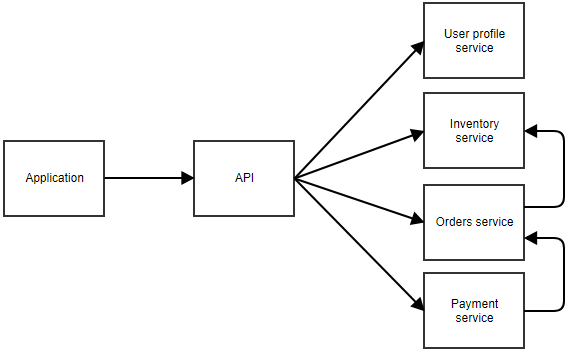 In the above diagram, the application calls a central API that forwards the call to the correct microservice. In this example, there are separate services for the user profile, inventory, orders, and payment.
You can imagine this is an application where the user can order something. The separate microservices can call each other too. For example, the payment service may notify the orders service when a payment succeeds. The orders service could then call the inventory service to adjust the stock.
There is no clear rule of how big a microservice can be. In the previous example, the user profile service may be responsible for data like the username and password of a user, but also the home address, avatar image, favorites, etc. It could also be an option to split all those responsibilities into even smaller microservices.
This is the pattern behind the systems people point to when they talk about scaling, the likes of Netflix and Amazon famously broke their monoliths into hundreds of services. That’s worth remembering for a different reason than you might expect: those companies moved to microservices after they had outgrown a monolith, not before. Reaching for microservices on day one is one of the most common ways teams sink a project under accidental complexity.
Advantages
- You can write, maintain, and deploy each microservice separately.
- A microservices architecture should be easier to scale, as you can scale only the microservices that need to be scaled. There’s no need to scale the less frequently used pieces of the application.
- It’s easier to rewrite pieces of the application because they’re smaller and less coupled to other parts.
Disadvantages
- Contrary to what you might expect, it’s actually easier to write a well-structured monolith at first and split it up into microservices later. With microservices, a lot of extra concerns come into play: communication, coordination, backward compatibility, logging, etc. Teams that miss the necessary skill to write a well-structured monolith will probably have a hard time writing a good set of microservices.
- A single action of a user can pass through multiple microservices. There are more points of failure, and when something does go wrong, it can take more time to pinpoint the problem.
Ideal for:
- Applications where certain parts will be used intensively and need to be scaled
- Services that provide functionality to several other applications
- Applications that would become very complex if combined into one monolith
- Applications where clear bounded contexts can be defined
How to Choose the Right Software Architecture Pattern
There’s no scoreboard that ranks these patterns from best to worst, so don’t go looking for one. The right choice depends on the problem in front of you. A few questions get you most of the way there:
- How complex is the domain? Simple CRUD rarely needs more than a light layered approach. Rich business rules are where CQRS and event sourcing start to pay off.
- What do the read and write loads look like? If reads vastly outnumber writes, CQRS lets you optimize each side on its own terms.
- Do you need a full history? If an audit trail or the ability to reconstruct past states is a hard requirement, event sourcing gives you that for free.
- Will parts of the system scale or change at different rates? That’s the signal for microservices, assuming your team can already build a clean monolith.
- Is there a stable core with optional features around it? Then a microkernel keeps the core small and the extensions independent.
Whatever you pick, the discipline that keeps an architecture healthy is the same: dependencies have to flow the way you intended. Tools like the NDepend dependency graph and dependency matrix let you see those dependencies and catch the ones that quietly break your design.
Combine
I’ve explained several software architecture patterns, as well as their advantages and disadvantages. But there are more patterns than the ones I’ve laid out here. It is also not uncommon to combine several of these patterns.
They aren’t always mutually exclusive. For example, you could have several microservices and have some of them use the layered pattern, while others use CQRS and event sourcing.
The important thing to remember is that there isn’t one solution that works everywhere. When we ask the question of which pattern to use for an application, the age-old answer still applies: “it depends.”
You should weigh in on the pros and cons of a solution and make a well-informed decision.
Frequently Asked Questions
What is a software architecture pattern?
A software architecture pattern is a reusable, high-level blueprint for organizing an entire system: how you divide the major pieces, where each responsibility lives, and how the pieces communicate. It operates at the level of the whole application, unlike a design pattern that solves a problem inside a class or a small group of classes.
What is the difference between a software architecture pattern and a design pattern?
Design patterns (such as singleton, factory, or observer) work at the code level and shape how individual classes are built and collaborate. Software architecture patterns (such as layered, microservices, or CQRS) work at the system level and shape the overall structure of the application. You typically use both together in the same project.
What are the 5 most common software architecture patterns?
The five most common software architecture patterns are the layered (n-tier) pattern, the microkernel (plug-in) pattern, CQRS, event sourcing, and microservices. Each one addresses a different problem and comes with its own advantages and trade-offs.
What is the most common software architecture pattern?
The layered (n-tier) pattern is the most common and most widely recognized software architecture pattern. Many developers use it without even knowing its name, because organizing code into presentation, business, and data access layers feels natural for standard line-of-business applications.
When should you use microservices instead of a monolith?
Reach for microservices when parts of your system need to scale or evolve independently, when several applications share the same functionality, or when a single monolith would grow too complex to manage. It’s usually easier to start with a well-structured monolith and split it into microservices once you actually feel that pain.
Can you combine software architecture patterns?
Yes. The patterns are not mutually exclusive. A common combination is microservices where some services use a layered design while others use CQRS together with event sourcing. CQRS and event sourcing in particular are frequently paired.
Nice article, Peter! These are great essentials that every developer should know about.
I like the clear structure of the article. What I’m missing is a suggestion on the architecture of the services of a microservice architecture.
could be added in this list the architecture of ports and adapters, the clean architecture or the onion
Simply fantastic with real-time examples