At the Visual Studio Live! Las Vegas 2026 keynote, Mads Kristensen laid out the vision for the future of development tools—centered on a bold idea: Visual Studio is evolving into an AI-native, deeply intelligent development environment.
You can watch the video here (36 minutes), and below is a summary with additional context and interpretation.
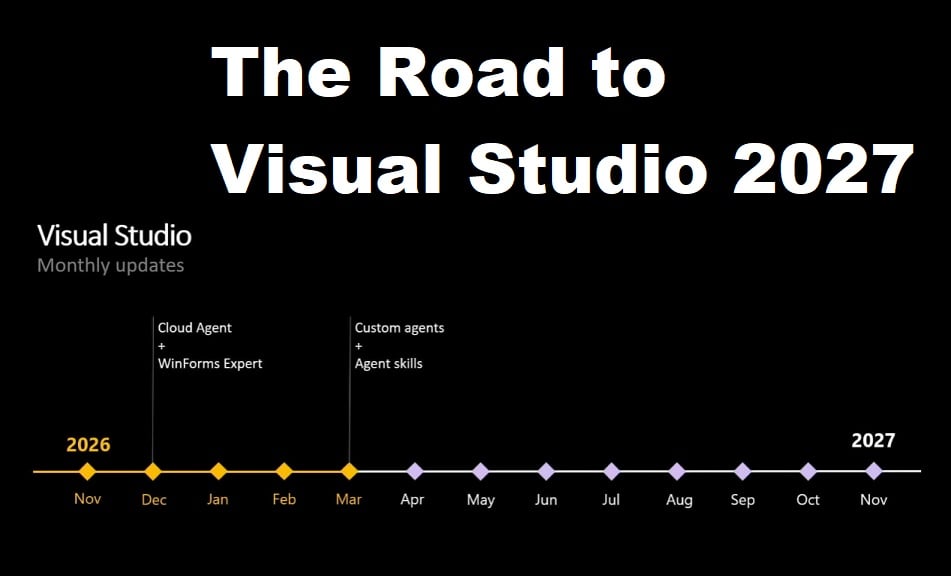
A New and Predictable Release Cadence
First let’s start with probably the most impactful announcement at 32:14: A New and Predictable Release Cadence
Visual Studio 2026 Insider was released in September 2025, followed by the General Availability (GA) release in November 2025. The “Insider” channel effectively replaces what used to be known as the Preview channel.
After the GA release, Microsoft adopted a continuous delivery model. General Availability builds are updated every month with new features, improvements, and bug fixes. In parallel, an Insider version is released on a weekly basis. These Insider builds are typically about one month ahead of the GA channel, allowing early access to upcoming changes.
Looking ahead, Visual Studio 2027 is expected to be released in November 2026, aligned with the releases of C# 15 and .NET 11. However, this will not be a major, side-by-side version like the transitions from Visual Studio 2019 to 2022 or from 2022 to 2026.
Instead, Visual Studio 2027 will essentially be a renaming of the existing product. It will be delivered as an in-place update to Visual Studio 2026 and will replace it entirely, rather than being installed alongside it. This marks a shift in strategy: instead of distinct major versions coexisting, Visual Studio will evolve continuously, with its name updated each year in November to reflect the current release cycle.
Why?
This reflects a broader industry trend already seen in browsers and cloud platforms. Innovation—particularly in AI—cannot wait for multi-year release cycles. Features need to ship continuously, evolve quickly, and improve based on real-world usage.
The Consequences
For developers and teams, this means adopting Visual Studio becomes less about “upgrading versions” and more about staying on a constantly improving platform.
Visual Studio is widely used in large enterprises where security and compliance teams often require formal approval before a specific version can be adopted. With this new release model, those organizations will need to adapt their processes in a similar way to how they previously adapted to the yearly release cadence of the .NET.
AI vs. Enterprise Developers
Mads opens the video with about 8 minutes of reflection on the current state of AI for enterprise developers. He highlights how rapidly things are evolving, creating a constant sense of urgency and a strong Fear Of Missing Out. Technologies and acronyms appear and get replaced within just a few months, leaving developers unsure of what to adopt—CLI or IDE, for example—and even questioning how they should work day to day.
He also touches on broader concerns around job security and shifting expectations. Roles like “prompt engineer,” heavily discussed not long ago, already feel outdated in 2026, Q2. There is even the provocative idea that teams of agents could eventually write most of the code while developers relax elsewhere, a notion echoed humorously by Scott Hanselman, who mentioned feeling guilty when no agent is working for him.
Despite these narratives, Mads grounds the discussion in reality. Most developers are still working in front of a screen, writing, reading, and reviewing code with varying levels of AI assistance. Many companies still restrict or forbid AI usage entirely, and this does not mean they are becoming obsolete or “dinosaurs.” Likewise, developers are not expected to abandon decades of experience to suddenly become orchestrators of AI agents overnight.
Instead, the message is clear: developer expertise remains critical. Even when AI generates code, that code still needs to be understood, debugged, adapted to future requirements, and integrated into larger systems and architectures. Far from reducing the importance of skilled developers, AI makes their judgment, experience, and technical depth even more essential.
Why tooling still matter?
At around 8:12, Mads reminds us that software development is not just about writing code. It is structured around three main dimensions:
Why: This is the problem space, driven by customer needs and business goals. It answers why we are building something and what outcomes we are trying to achieve. This is typically the domain of product thinking and product designers.
What: This is the solution space, covering architecture, feature design, and system structure. It defines what we are building and how the solution is shaped, often involving architects and UX designers.
How: This is the execution space, where implementation happens. It includes writing code, DevOps, and CI/CD pipelines, and is primarily the domain of developers and engineering teams.
Everyone in a software team contributes across these three areas, but with different focus points. AI can assist in parts of all of them, helping reduce low-level friction and allowing developers to operate at a higher level of abstraction. This enables a better overview of problems rather than getting lost in implementation details. As a rule of thumb, Mads suggests that every feature you build should clearly provide value to another team or stakeholder; if it does not, it is worth reconsidering its purpose.
In this context, an Intelligent Developer Interface (IDI) (or or AI-enhanced IDE) becomes even more relevant than before. It helps developers navigate codebases, modify and test code efficiently, and leverage AI agents as support tools to accelerate work while keeping full control of design and intent.
Copilot-powered profiling and optimization demo
At 14:43 a 9-minute Copilot demo that begins . In this demo, Copilot actively orchestrates multiple Visual Studio tools such as the profiler, the compiler, the code editor and the test runner, rather than simply suggesting code changes in isolation.
The application used for the demonstration is the well-known open-source .NET project QRCoder, which generates QR codes. Within Visual Studio, new options such as “Profile” and “Profile with Copilot” appear directly in the unit test explorer, showing how tightly integrated the experience has become.
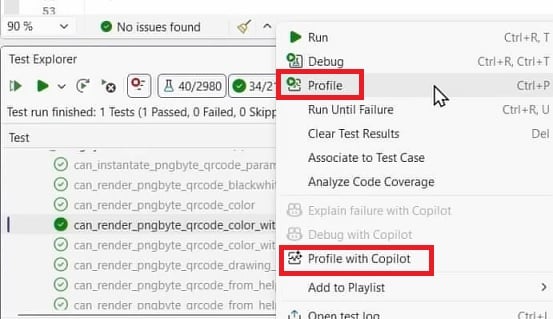
Copilot first runs the tests to establish a baseline and measure current performance. It then attempts to improve performance in a controlled and repeatable way, using the compiler and tests as a safety net. The agent analyzes profiling results, including stack traces, call counts, and the performance contribution of individual methods, in order to identify the hot paths in the code.
From there, Copilot proposes optimization strategies, applies code changes, recompiles the project, and re-runs the tests to validate the impact. In the final result, the selected test shows a 63% performance improvement, achieved mainly by replacing slower floating-point math operations with more efficient integer-based calculations.
Preparing for AI: testing, backlog, and agents
At 25:05, Mads explains a new advantage of having a well-tested application with strong unit test coverage: each test can serve as a controlled sandbox for AI-driven experimentation. In this model, an AI agent can use individual tests as safe environments to explore changes, measure impact, and iteratively improve the code without risking unintended side effects.
With an estimated 200 million lines of code in Visual Studio itself, Microsoft is also increasing its own internal test coverage to ensure the IDE can evolve faster while remaining stable, reliable, and easier to improve over time.
Beyond tests, Mads emphasizes that the backlog itself becomes increasingly important. It should not just be a list of ideas, but an actionable, well-structured set of tasks that clearly communicates intent. In this model, AI agents can interpret backlog items as instructions, execute them, iterate on solutions, and refine their work—either with human supervision or in a more autonomous loop—until the issue is fully resolved, verified, and approved.
Visual Studio Future Directions
Based on this demo and the overall plan, at 28:56 Mads outlines the future directions they intend to focus on:
-
Testing: mads openly admitted (a “mea culpa”) that Test Explorer is not as smooth, modern, or fast as it should be. The plan is to significantly improve it so it becomes a more modern testing experience, with better performance, better responsiveness, and a workflow that feels up to date.
-
Diagnostics (Debugging and Profiling): Visual Studio already has one of the best debuggers available, but there is still room to improve the overall diagnostics experience. The focus is on making debugging and profiling more fluid, more integrated, and easier to use in real workflows.
-
Build + Run: With AI generating more code, developers are expected to trigger Build and Run more frequently. Because of this, Microsoft wants to make this loop faster, smoother, and less disruptive, so iteration feels immediate and efficient.
-
Integration: Visual Studio should integrate more deeply with external development systems such as Jira, GitHub Actions, and other CI/CD or tracking tools. The goal is to reduce context switching and make these systems feel native to the IDE.
-
Reviewing: As AI-generated code increases a lot, code review becomes a more important part of the workflow. Developers will spend more time validating and refining code rather than writing everything manually.
-
Meaningful AI: Visual Studio remains a professional IDE for C# and C++ developers. AI is not about turning the IDE into a prompt-driven tool, but about making existing features smarter, more contextual, and more productive. The “profiling with agent” feature is a strong example of what Mads means by meaningful AI. Also on the new Visual Studio features side, Mads proudly mentions Copilot agent skills, along with the ability to build custom agents in the April 2026 update.
What was not mentioned
Mads did not mention whether the “Dev17”, “Dev18”, and similar internal code names will continue to be used going forward, or if they will be replaced as part of this new naming and release model.
Conclusion
This is a very good and informative session. I especially appreciate the first part, where Mads helps relieve the pressure many of us feel as the industry evolves so quickly and we constantly get the impression that we are late on every new trend.
On one hand, he reassures Visual Studio users that they are not going to be replaced anytime soon, and that our daily work is actually becoming more interesting. On the other hand, one might wonder whether Mads could have gone further and explicitly said that we will be competing directly with tools like Claude Code and Codex—so we should just prepare to do something else with our lives.
There are not many comments on the video, but we can already see a clear polarization emerging between: “I actually enjoy coding, I don’t want AI to do it for me. :(“ to “Visual Studio is in GREAT DANGER of becoming an irrelevant Dinosour. Its the time we live in, its NO LONGER just AI coding Assistants But instead full on AUTONOUMS AI Software Developer AGENTS “.
On the bright side, if Visual Studio users were to be laid off at scale, the devenv team would likely detect it quickly and adjust their strategy toward a more aggressive AI direction than what is currently presented. At the same time, we are already seeing headlines like: “The Great AI Reversal: Why Tech is Quietly Rehiring Senior Engineers”, arguing that generative AI did not replace developers, but instead disrupted the junior pipeline, reduced code quality in many cases, and made experienced system designers more valuable than ever.
BTW at 34:12, Mads advice you to use the Help > Send Feedback options, because your feedback will go directly to the team. 5.000 user reported bugs have been fixed in 12 months (that’s 23 bug fixes per work day!) and implemented 300 request features.