C# Nullable is two features sharing one name. The older one, nullable value types, has been around since C# 2.0 in 2005 and lets a struct like int hold a null. The younger one, nullable reference types, shipped with C# 8.0 in 2019 and turns the compiler into a static analyzer that tells you when you might dereference null.
Both exist because the same word — null — means three different things in real code: “I do not know yet”, “this field is optional”, and “an error happened”. Conflating those is what produced the billion-dollar mistake. C# does not pretend the problem is solved, but it gives you enough machinery to push most NullReferenceException bugs from runtime to compile time. This article walks through that machinery end to end, with code you can paste into a console project and run.
C# Nullable Cheat Sheet
If you only want the summary, here it is:
| Feature | Since | Syntax | Notes |
|---|---|---|---|
| Nullable value type | C# 2.0 | int?, Nullable<int> |
Wraps a struct. .HasValue and .Value. |
| Null-coalescing | C# 2.0 | a ?? b |
b is returned when a is null. |
| Null-conditional | C# 6.0 | obj?.Member |
Short-circuits on null. |
| Null-coalescing assignment | C# 8.0 | a ??= b |
Assigns b only if a is null. |
| Nullable reference types | C# 8.0 | string? |
Compile-time only. Needs <Nullable>enable</Nullable> in csproj. |
| Null-forgiving | C# 8.0 | expr! |
“Trust me, not null.” Suppresses the warning. |
| Nullable attributes | C# 8.0+ | [NotNullWhen(true)] |
Teach the compiler about your API. |
| Pure-null pragmas | C# 8.0 | #nullable enable |
File or block-level override. |
| Required members | C# 11 | required string Name |
Caller must initialize. |
| field keyword | C# 13 | get; set; |
Helps annotate auto-properties cleanly. |
Every row gets unpacked below.
The .csproj You Need
Before any of the reference-type machinery activates, the compiler needs to know the project is opted in. New .NET project templates set this for you. Older ones do not, and that is the single most common reason people say “but my string? is not warning about anything”.
Drop this in the PropertyGroup of your .csproj:
|
1 2 3 4 5 6 7 8 9 10 11 12 13 |
<Project Sdk="Microsoft.NET.Sdk"> <PropertyGroup> <OutputType>Exe</OutputType> <TargetFramework>net10.0</TargetFramework> <LangVersion>latest</LangVersion> <Nullable>enable</Nullable> <TreatWarningsAsErrors>true</TreatWarningsAsErrors> <WarningsAsErrors>nullable</WarningsAsErrors> <ImplicitUsings>enable</ImplicitUsings> </PropertyGroup> </Project> |
Two things are worth calling out here:
<Nullable>enable</Nullable>turns on both the annotation context (the?suffix is meaningful) and the warning context (the compiler emits null warnings). It is the setting you almost always want.<WarningsAsErrors>nullable</WarningsAsErrors>promotes only the nullable warnings to errors. Without this, a CS8602 warning is something you can scroll past in the build log. With it, you cannot ship code that the compiler thinks might NRE. We will discuss the four contexts below if you need a more gradual migration.
If you only want to turn it on for a single file — the typical pattern when migrating — the per-file pragma is:
|
1 2 3 4 |
#nullable enable string? maybe = null; Console.WriteLine(maybe?.Length ?? -1); |
That pragma is also useful in the other direction: a generated file inside an enabled project may want #nullable disable at the top.
Nullable Value Types: int?, bool?, DateTime?
A value type like int cannot be null. The bits that represent zero are valid bits, and there is no “not a number” slot reserved for the absence of a value. So C# 2.0 introduced Nullable<T>, a struct that wraps a value type T and adds a boolean saying whether the T is meaningful.
The struct is generic and the language gives it a one-character shorthand:
|
1 2 3 4 5 6 7 8 9 10 11 12 |
int? score = null; bool? vote = true; DateTime? expires = new DateTime(2030, 1, 1); // Nullable<int> and int? are the same type. Nullable<int> alsoScore = null; score = 42; Console.WriteLine(score); // 42 Console.WriteLine(vote); // True Console.WriteLine(expires); // 1/1/2030 12:00:00 AM Console.WriteLine(alsoScore is null); // True |
T cannot itself be a nullable value type, so int?? as a type does not exist. The ?? you sometimes see is the null-coalescing operator, not a double nullable.
HasValue, Value and GetValueOrDefault
A Nullable<T> exposes three members worth memorizing:
|
1 2 3 4 5 6 7 8 9 10 11 12 13 14 |
public static void Members() { int? a = 7; int? b = null; if (a.HasValue) Console.WriteLine($"a is {a.Value}"); // a is 7 // Throws InvalidOperationException at run time. // int crash = b.Value; int safeA = a.GetValueOrDefault(); // 7 int safeB = b.GetValueOrDefault(); // 0 int safeC = b.GetValueOrDefault(-1); // -1 } |
In modern C# I rarely write .HasValue. The is-pattern reads better and gives you the unwrapped value in the same step:
|
1 2 3 4 5 6 7 8 |
public static void Pattern() { int? x = 42; if (x is int v) Console.WriteLine($"x is {v}"); else Console.WriteLine("x is null"); } |
GetValueOrDefault is the one to reach for when you want zero allocation and no exception path. It is also the only way to specify a custom default that is not a constant expression, which the ?? operator cannot always express.
Lifted Operators: When null Propagates
Operators on int — +, -, *, ==, < and so on — are automatically “lifted” to int?. The rule for arithmetic is simple: if either operand is null, the result is null. The rule for comparison operators is the surprising one and trips up almost everyone the first time they hit it.
|
1 2 3 4 5 6 7 8 9 10 11 12 13 14 15 16 17 18 19 |
public static void Lifted() { int? a = 10; int? b = null; int? c = 10; a++; // 11 a = a * c; // 110 a = a + b; // null (arithmetic propagates null) Console.WriteLine(10 >= (int?)null); // False Console.WriteLine(10 < (int?)null); // False Console.WriteLine(10 == (int?)null); // False int? x = null; int? y = null; Console.WriteLine(x == y); // True Console.WriteLine(x >= y); // False } |
Read that carefully: two nulls are equal under ==, but neither is greater-or-equal to the other. That is consistent with SQL three-valued logic and inconsistent with normal C# expectations. If you sort or do range checks on nullable values, lift them out first with GetValueOrDefault or a pattern match.
One more wrinkle: bool? does not propagate null the way int? does. The & and | operators behave like SQL boolean logic: true | null is true, false & null is false. The truth table is worth a glance the first time you write a bool? expression.
Boxing and Unboxing a Nullable<T>
When you box a Nullable<T>:
- If
HasValueis false, the result is a real null reference, not a boxedNullable<T>. - If
HasValueis true, the result is a boxedT, not a boxedNullable<T>.
That is why .GetType() on a non-null int? returns System.Int32, not System.Nullable`1[System.Int32]. To detect a nullable value type you have to look at the Type, not at the instance:
|
1 2 3 4 5 6 7 8 |
Console.WriteLine(IsNullable(typeof(int?))); // True Console.WriteLine(IsNullable(typeof(int))); // False int? a = 17; Console.WriteLine(a.GetType().FullName); // System.Int32 static bool IsNullable(Type t) => Nullable.GetUnderlyingType(t) is not null; |
Nullable Reference Types: string vs string?
Here is the part most newcomers find confusing: a string and a string? are exactly the same type at run time. Both are System.String. The ? is not part of the type system in the CLR sense. It is an annotation the compiler stores on the metadata and uses to reason about your code.
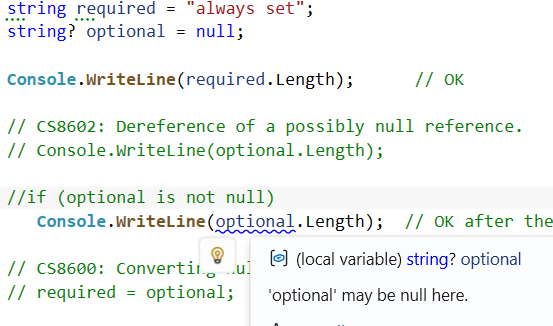
That has two practical consequences. First, no runtime cost. None. The IL is identical. Second, the compiler is a static analyzer, not a guarantee. If you call into a library that was not compiled with nullable enabled, or you receive data over the wire, or you reflect, the runtime cannot stop a null from sliding into a string variable. What it can do is warn you everywhere you have failed to defend against that possibility in code you control.
|
1 2 3 4 5 6 7 8 9 10 11 12 13 |
string required = "always set"; string? optional = null; Console.WriteLine(required.Length); // OK // CS8602: Dereference of a possibly null reference. // Console.WriteLine(optional.Length); if (optional is not null) Console.WriteLine(optional.Length); // OK after the check // CS8600: Converting null literal or possible null value to non-nullable type. // required = optional; |
A Person type whose names are required and whose middle name is optional now reads like specification:
|
1 2 3 4 5 6 7 8 9 10 11 12 13 14 15 |
public sealed class Person { public Person(string firstName, string lastName) { FirstName = firstName; LastName = lastName; } public string FirstName { get; } public string? MiddleName { get; init; } public string LastName { get; } public override string ToString() => MiddleName is null ? $"{FirstName} {LastName}" : $"{FirstName} {MiddleName} {LastName}"; } |
Notice the override does not null-check FirstName or LastName. It does not have to, because the type system promised they are not null. That is the entire point: turn an invariant you used to enforce with asserts into something the compiler enforces for you.
The Four Nullable Contexts
The <Nullable> element in your csproj can take four values. They are two orthogonal flags — annotations and warnings — packaged into a single property:
| Setting | Annotations | Warnings | Reference types | ? suffix | ! operator |
|---|---|---|---|---|---|
| disable | off | off | all nullable | warning | no effect |
| enable | on | on | non-null unless ? | declares nullable | suppresses warnings |
| warnings | off | on | all nullable | warning | suppresses warnings |
| annotations | on | off | non-null unless ? | declares nullable | no effect |
In day-to-day work you want enable. The other three exist almost entirely for migration. If you inherit a 200-class codebase, warnings only is the polite way to start: the compiler flags every place where dereferencing might NRE without forcing you to annotate everything first. Once you have triaged those, switch to enable and start adding ? where it belongs.
The same flags exist as pragmas so you can override them file by file or block by block:
|
1 2 3 4 5 |
#nullable enable // turn both flags on #nullable disable // turn both flags off #nullable restore // back to the project setting #nullable enable warnings // warn only #nullable disable annotations // ignore ? but still warn |
Null-State Analysis: not-null vs maybe-null
Inside a nullable-enabled context, the compiler tracks the “null-state” of every reference expression. The state is one of two values: not-null or maybe-null. Assignments and null checks update it.
|
1 2 3 4 5 6 7 8 9 10 11 12 13 14 15 16 |
string? message = null; // CS8602 warning: message is maybe-null here. // Console.WriteLine(message.Length); message = "Hello, World!"; // No warning: assignment of a non-null literal made it not-null. Console.WriteLine(message.Length); if (Read() is { } nonNull) { // Inside this block, nonNull is not-null. Console.WriteLine(nonNull.Length); } static string? Read() => "data"; |
The analysis follows if, while, switch, pattern matches, and even returns and throws inside the same method. What it does not do is follow into the bodies of other methods. If you write your own IsNullOrEmpty, the compiler will not know that the input is non-null when the method returns false unless you tell it — which is what nullable attributes exist for.
The Null-Coalescing Operator ??
The double-question-mark operator returns its left operand when that operand is non-null, and otherwise evaluates and returns its right operand:
|
1 2 3 4 5 6 7 8 9 10 11 12 13 14 15 |
public static void Coalesce() { int? a = null; int b = a ?? -1; // -1 string? name = LoadName(); string safe = name ?? "Anonymous"; // ??= assigns only if the left side is null. List<int>? items = null; items ??= new List<int>(); items.Add(1); } private static string? LoadName() => null; |
A small but useful idiom: ?? composes. So name ?? cached ?? "Anonymous" walks the chain until something non-null shows up.
The Null-Conditional Operator ?.
The ?. operator short-circuits the rest of the expression to null when the left side is null. It works for property access, method calls, indexers, delegate invocation, and chains:
|
1 2 3 4 5 6 7 8 9 10 11 12 13 14 15 16 17 18 19 20 21 22 23 24 25 26 |
Customer? c = null; string? city = c?.Address?.City; // null, no NRE int? length = c?.Address?.City?.Length; // null, no NRE // Combine with ?? for a default. int safeLength = c?.Address?.City?.Length ?? 0; Console.WriteLine(safeLength); // 0 // Indexers work too. int[]? buffer = null; int? first = buffer?[0]; // null, no IndexOutOfRange // Delegate invocation: thread-safe event raise idiom. EventHandler? handler = null; handler?.Invoke(null, EventArgs.Empty); public sealed class Address { public string? City { get; init; } } public sealed class Customer { public Address? Address { get; init; } } |
Two warnings about ?.. First, it evaluates the left operand only once. That makes handler?.Invoke(...) the right way to raise an event from a multithreaded class, but it is not magical: it only protects against null, not against other threads tearing the object down. Second, ?. on a value-typed member produces a Nullable<T>. So c?.Address?.City?.Length is int?, not int.
The Null-Forgiving Operator !
Suffixing an expression with ! tells the compiler “trust me, this is not null”. The IL is unchanged. At run time, ! does nothing. All it does is suppress the static analyzer.
|
1 2 3 4 5 6 7 8 9 10 11 12 |
string? name = Lookup("ada"); // We know Lookup returned non-null for "ada", but the // return type is string? so the compiler is cautious. int length = name!.Length; Console.WriteLine(length); static string? Lookup(string id) => id switch { "ada" => "Ada Lovelace", _ => null }; |
Every ! in a codebase is a place the compiler has been told to look the other way. They are not forbidden, but they are debt. Before reaching for one, ask whether a null check, an Assert/throw, or a nullable attribute on the API would let the compiler reach the same conclusion on its own.
A common legitimate use is in unit tests, where you arrange a value you know is non-null and want to avoid littering Assert.NotNull boilerplate. Another is for the famous “compiler cannot see through this” case: the parameterless constructor of an EF Core entity, for example, where the framework will populate properties via reflection.
Pattern Matching with null
C# pattern matching gives you the most readable way to handle nullability in modern C#. The two patterns you reach for most often are is null and is { }:
|
1 2 3 4 5 6 7 8 9 10 11 12 13 14 15 16 17 18 19 20 21 22 23 24 25 |
using System; public static class Patterns { public static void Greet(string? input) { switch (input) { case null: Console.WriteLine("nobody"); break; case { Length: 0 }: Console.WriteLine("empty"); break; case { } name: // not null, captured Console.WriteLine($"hello {name}"); break; } } public static int LengthOrMinusOne(string? s) => s is { } v ? v.Length : -1; } |
is null is also the right way to compare against null when the type might overload operator==. It bypasses the overload and asks “is this reference null?”, which is almost always what you actually want.
Nullable Attributes for API Contracts
The compiler cannot reason inside the body of a method it is calling. Nullable attributes are how you teach it about your contracts. They live in System.Diagnostics.CodeAnalysis. The ones that earn their keep:
|
1 2 3 4 5 6 7 8 9 10 11 12 13 14 15 16 17 18 19 20 21 22 23 24 25 |
using System.Diagnostics.CodeAnalysis; public static class Contracts { // Tells the compiler: when this returns true, value is not null. public static bool IsPresent([NotNullWhen(true)] string? value) => !string.IsNullOrEmpty(value); // Tells the compiler: the caller may pass null, but if no exception // is thrown the value is not null on return. public static void EnsureNotNull([NotNull] string? value) { if (value is null) throw new System.ArgumentNullException(nameof(value)); } // Tells the compiler: I am guaranteed not null, even though my type // parameter T could be nullable. public static T NotNull<T>([NotNull] T? value) where T : class { if (value is null) throw new System.ArgumentNullException(nameof(value)); return value; } } |
The full set is small enough to learn in one sitting:
| Attribute | Meaning |
|---|---|
| AllowNull | Caller may pass null to a non-nullable parameter or property. |
| DisallowNull | Caller must not pass null to a nullable parameter or property. |
| NotNull | On return, the value is guaranteed not null. |
| MaybeNull | On return, the value might be null even if T is non-nullable. |
| NotNullWhen(bool) | On return, value is not null when the method returns the given bool. |
| MaybeNullWhen(bool) | On return, value might be null when the method returns the given bool. |
| NotNullIfNotNull(name) | The return value is not null if the named argument is not null. |
| MemberNotNull(name) | After this method returns, the named member is not null. |
| MemberNotNullWhen(b, name) | After this method returns the bool b, the named member is not null. |
MemberNotNull is the one I use most after NotNullWhen. It is the right answer for an Initialize() method that assigns several non-nullable fields:
|
1 2 3 4 5 6 7 8 9 10 11 12 13 14 15 16 17 18 19 |
public sealed class Connection { private string? endpoint; private byte[]? buffer; [MemberNotNull(nameof(endpoint), nameof(buffer))] public void Open(string url) { endpoint = url; buffer = new byte[4096]; } public void Send() { // No warning: the compiler knows Open made these non-null. System.Console.WriteLine(endpoint.Length); System.Console.WriteLine(buffer.Length); } } |
Generics: What T? Means Depends on T
Generic code interacts with nullable in ways that surprised me the first time I hit them. The reason is that T can stand for either a reference type or a value type, and the meaning of T? has to bend to fit.
For an unconstrained T:
Box<string>— T isstring, T? isstring?Box<int>— T isint, T? isint(the ? has no effect on a struct without thestructconstraint)Box<string?>— T isstring?, T? is stillstring?
Constraints fix the ambiguity:
|
1 2 3 4 5 6 7 8 9 10 11 12 13 14 15 16 17 18 19 |
public class Box<T> where T : class { public T? Maybe { get; set; } // T? is nullable reference type } public class ValueBox<T> where T : struct { public T? Maybe { get; set; } // T? is Nullable<T> } public class NotNullBox<T> where T : notnull { public T Value { get; set; } = default!; } public static class FirstOrDefaultDemo { public static T? FirstOrDefault<T>(IEnumerable<T> source) { foreach (T item in source) return item; return default; } } |
The notnull constraint was added in C# 8 specifically for the nullable era. It bans both nullable reference types and nullable value types as type arguments. For example Dictionary<TKey, TValue> uses it to express “the key cannot be null” without forcing TKey to be either a class or a struct.
Required Members: Plugging the Constructor Hole
Before C# 11, an object initializer could leave a non-nullable property uninitialized:
|
1 |
var p = new Person { FirstName = "Ada" }; // LastName left null, no warning |
C# 11 introduced the required modifier. Required members must be assigned by the caller, either in the constructor argument list or in the object initializer. Otherwise it is a compile error.
|
1 2 3 4 5 6 7 8 9 10 11 12 13 14 |
// OK var p = new Person2 { FirstName = "Grace", LastName = "Hopper" }; // Error CS9035: Required member 'Person2.LastName' must be set. // var bad = new Person2 { FirstName = "Grace" }; Console.WriteLine(p.FirstName); public sealed class Person2 { public required string FirstName { get; init; } public string? MiddleName { get; init; } public required string LastName { get; init; } } |
If your codebase has a lot of POCOs, switching them from constructor-with-arguments to init-with-required is one of the more pleasant cleanups nullable enables.
Common Pitfalls
A few traps that catch almost everyone at least once.
Default structs
A struct’s default value zeroes every field, including non-nullable reference-typed ones. The compiler does not warn:
|
1 2 3 4 5 6 7 8 9 10 |
Student s = default; // s.FirstName is null at run time, with no compile-time warning. Console.WriteLine(s.FirstName?.Length ?? -1); // -1 public struct Student { public string FirstName; // non-nullable, but... public string? MiddleName; public string LastName; } |
The fix is to prefer required members or a parameterized constructor. If the type really must be a struct with a non-nullable reference field that callers might forget to set, you are taking the trade-off into your own hands.
Arrays of references
new string[3] creates an array whose three slots are null. There is no warning. Collection expressions force you to initialize every slot:
|
1 2 3 4 5 |
string[] uninit = new string[3]; // all null at run time Console.WriteLine(uninit[0]?.Length ?? -1); string[] init = ["a", "b", "c"]; // every slot filled Console.WriteLine(init[0].Length); |
LINQ and FirstOrDefault
FirstOrDefault on an empty sequence returns the default of the element type. For a reference type, that is null even if the type parameter is not annotated. Prefer the C# 9 overload that takes an explicit default:
|
1 |
string first = list.FirstOrDefault("missing"); |
Calling into nullable-oblivious libraries
If a third-party library was compiled without nullable, the compiler treats its types as “oblivious”: neither nullable nor non-nullable. That is a deliberate choice to avoid drowning callers in warnings, but it means you may need to add explicit checks at the boundary anyway.
== overloading
A class that overloads operator== may not handle null correctly. Use is null and is not null instead. The compiler will not warn you, and the resulting bug is the kind that ships.
Migrating an Existing Project
There is no one true migration path, but the following ordering tends to hurt least:
- Turn on
<Nullable>warnings</Nullable>in the csproj. Build. Count. - Pick a leaf project. The fewer references in, the easier the annotation pass.
- Switch that one project to
<Nullable>enable</Nullable>and annotate from the public API inward. Public surface first, then implementations, then internal helpers. - Reach for nullable attributes when a warning is honest but the code is correct. Reach for
!only as a last resort. - Once the leaf compiles clean, repeat on the next project upstream. Annotations are infectious: each migrated project gives the next one better information.
A useful diagnostic the first day you turn warnings on: WarningsAsErrors with just nullable in the value. That way the rest of your build does not start exploding while you are halfway through migration.
C# Nullable FAQ
What is the difference between nullable value types and nullable reference types?
Nullable value types are a runtime feature: int? is a different type from int, backed by a struct that adds a HasValue flag.
Nullable reference types are a compile-time feature: string? is the same type as string at run time, and the ? is just an annotation that drives compiler warnings.
When was nullable introduced in C#?
Nullable value types arrived in C# 2.0 in 2005. Nullable reference types arrived in C# 8.0 in 2019. The null-conditional ?. operator arrived in C# 6.0 in 2015. The null-coalescing assignment ??= arrived in C# 8.0. Required members landed in C# 11 in 2022.
Do nullable reference types cost anything at run time?
No. The compiler emits exactly the same IL whether you write string or string?. The only artifacts are attributes in metadata that other compilers, reflection-based libraries (notably Entity Framework Core), and analyzers can read.
Why is the compiler not warning me about my string??
The most common reason is that <Nullable>enable</Nullable> is missing from your csproj. The second most common is that you are in a file whose name ends in .designer.cs, .generated.cs, .g.cs, or .g.i.cs, which the compiler treats as generated and skips. Add <auto-generated/> in a leading comment to confirm, or the opposite to override.
How do I check a nullable value type for null?
Use an is pattern: if (x is int v) gives you the value when there is one. .HasValue and != null also work. Avoid .Value unless you already know the value is present, because it throws InvalidOperationException on null.
What does the ! operator actually do at run time?
Nothing. It only suppresses a compiler warning. The IL is identical to the expression without it.
Should I use ! to silence nullable warnings?
Sparingly. Each ! is a place the compiler can no longer help you. Prefer a null check, a pattern match, or a nullable attribute that lets the compiler reach the same conclusion on its own.
How do I express “this method returns a non-null result when its argument is non-null”?
Use NotNullIfNotNull on the return, naming the parameter: [return: NotNullIfNotNull(nameof(input))]. The classic example is a Trim wrapper that returns null exactly when the input is null.
Does nullable work with records?
Yes. Records are reference types (unless you write record struct) and obey the same rules. Positional records with non-nullable parameters give you required-style initialization for free.
Why does (int?)10 < null return false instead of true?
Because comparison operators on nullable value types follow SQL three-valued logic. If either operand is null, the answer is false. That includes greater-than, less-than, and their or-equal variants. Equality is the exception: null == null is true.
Conclusion
C# Nullable is two features and one mindset. The two features are nullable value types, which give you a real runtime container for “maybe absent”, and nullable reference types, which give the compiler enough information to flag almost every NullReferenceException before it ships. The mindset is treating the absence of a value as part of the type, not as an afterthought tacked on at run time.
Enable it project-wide. Promote nullable warnings to errors. Annotate from the outside in. Reach for nullable attributes when the compiler is wrong and ! only when you have run out of other options. The first week is irritating. After that, you stop writing the kind of code that silently NREs.
Comments:
Comments are closed.